How to Automate Repetitive Business Tasks Without Coding (Complete 2026 Guide)
Most businesses still assume that automate business tasks is only possible if they hire software developers or learn programming languages. Fortunately, that assumption is no longer true. Today’s no-code automation tools allow businesses to automate repetitive tasks using visual workflow builders, drag-and-drop interfaces, and pre-built integrations—without writing a single line of code.
Whether you’re a startup founder, small business owner, freelancer, marketing professional, HR manager, finance specialist, or operations leader, no-code business automation can dramatically reduce manual work while improving efficiency. Instead of spending hours copying data between applications or sending repetitive emails, you can let intelligent workflows handle these tasks automatically.
In this comprehensive guide, you’ll learn how no-code workflow automation works, the benefits it offers, which business processes should be automated first, and practical examples that you can implement immediately. By the end, you’ll understand how to build automated business workflows that save time, reduce errors, and help your organization scale faster.
Direct Answer: How Can You Automate Repetitive Business Tasks Without Coding?
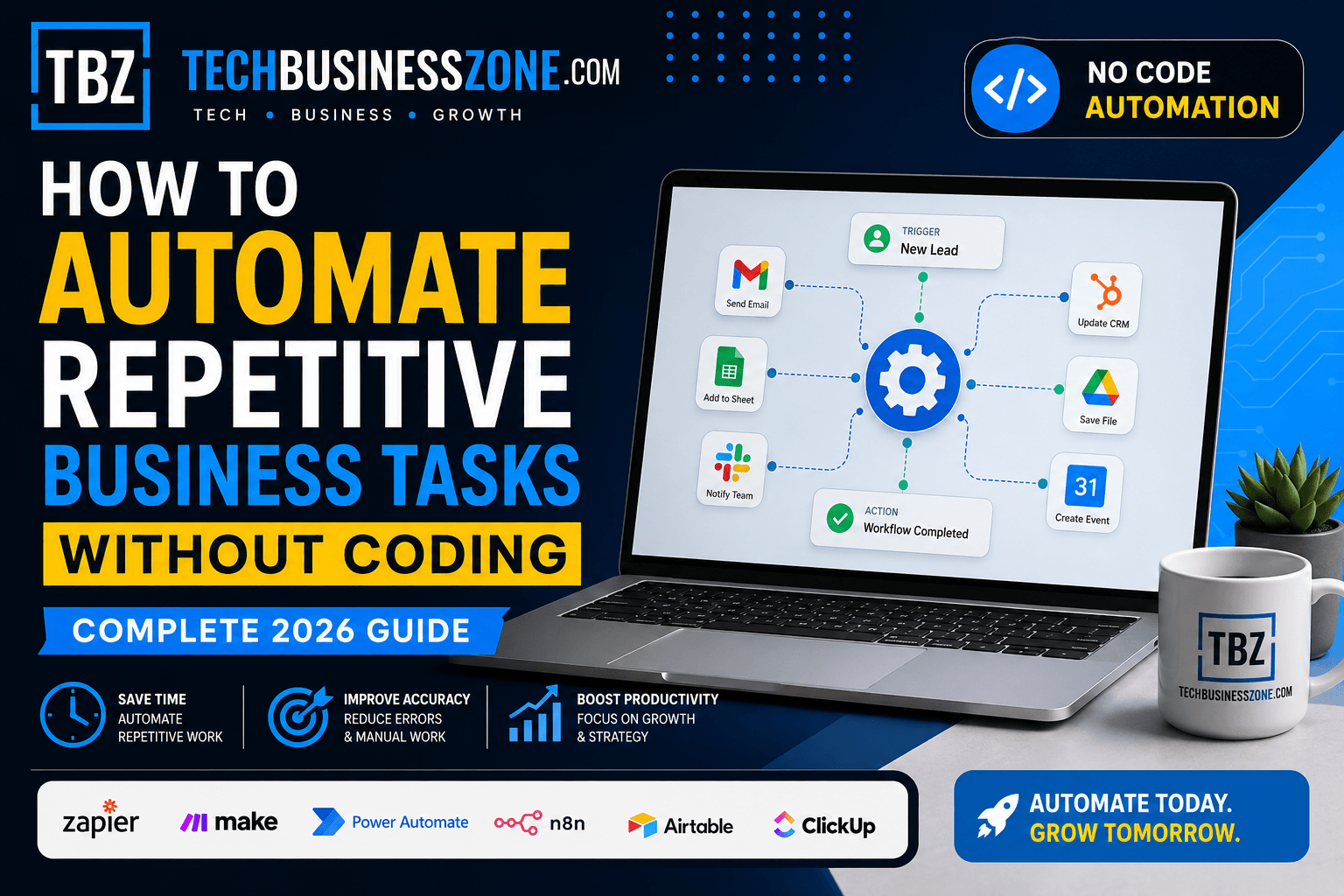
Automating repetitive business tasks without coding involves using no-code automation platforms that connect your favorite business applications through visual workflow builders. Instead of manually performing repetitive actions, you simply create workflows by selecting triggers, defining actions, and connecting multiple applications.
These platforms integrate tools such as email services, CRM systems, project management software, accounting applications, cloud storage, customer support platforms, and communication apps. When one event occurs—such as receiving a new customer inquiry—the automation immediately performs one or several predefined actions.
For beginners, the process is straightforward:
- Identify a repetitive business task.
- Choose a no-code automation platform.
- Connect the required business applications.
- Select an automation trigger.
- Define one or more automated actions.
- Test the workflow.
- Activate and monitor the automation.
For example, when a customer submits a website contact form, the workflow can automatically:
- Add the lead to your CRM.
- Send a personalized welcome email.
- Notify your sales team through Slack or Microsoft Teams.
- Schedule a follow-up reminder.
- Store customer information in Google Sheets.
The biggest advantages include significant time savings, fewer manual mistakes, improved customer response times, lower operational costs, and increased business productivity.
What Is No-Code Business Automation?
Modern organizations increasingly rely on automate business tasks to eliminate repetitive work. Understanding the fundamentals helps you choose the right automation strategy before investing time and resources.
Understanding No-Code Automation
No-code automation allows anyone to create automated workflows using visual interfaces rather than programming code. Users simply choose applications, define triggers, and specify actions using drag-and-drop builders.
This approach democratizes automation by making advanced workflow creation accessible to non-technical employees. Marketing teams, HR professionals, accountants, and operations managers can now automate their own daily processes without depending on IT departments.
No-Code vs Low-Code Automation
Although the terms are often used interchangeably, they serve different audiences.
No-code automation and automate business tasks is designed for business users with no programming knowledge. Everything is built visually using templates and pre-configured integrations.
Low-code automation, on the other hand, allows developers or technically inclined users to customize workflows with small amounts of code. It offers greater flexibility but requires technical expertise.
For most small businesses and startups, no-code workflow builders provide everything needed for everyday automation.
How Workflow Automation Works
Every automated workflow follows a simple sequence:
Trigger → Conditions → Actions
For example:
A customer places an order → The automation checks payment status → It creates an invoice → Sends a confirmation email → Updates inventory → Notifies the shipping department.
Each step occurs automatically without human intervention, ensuring consistent execution every time.
Common Automation Triggers and Actions
Automate business tasks. Triggers are events that start an automated workflow.
Popular triggers include:
- New online form submission
- Customer purchase
- Incoming email
- New CRM contact
- Calendar appointment
- File uploaded to cloud storage
- Support ticket created
Once triggered, the automation performs predefined actions such as:
- Sending emails
- Creating tasks
- Updating databases
- Posting Slack notifications
- Generating invoices
- Scheduling meetings
- Moving files between folders
Combining multiple triggers and actions creates powerful digital workflow management systems.
APIs Explained in Simple Language
Many people hear the word API and immediately assume automation is technical. In reality, modern no-code automation software hides almost all of the complexity.
An API (Application Programming Interface) is simply a bridge that allows different applications to communicate with each other.
Instead of writing API code manually, no-code platforms connect these applications automatically. Users simply authorize access with a few clicks, while the platform handles the technical communication behind the scenes.
Why Businesses Are Replacing Manual Processes
Manual processes consume valuable employee time while increasing the likelihood of mistakes.
Tasks like copying customer information, updating spreadsheets, sending reminder emails, generating invoices, and assigning work are repetitive but essential.
Businesses replace these activities with business process automation because automated workflows:
- Operate 24/7
- Never forget routine tasks
- Reduce costly human errors
- Improve customer satisfaction
- Increase operational efficiency
- Free employees for higher-value work
As companies grow, automation becomes a necessity rather than a luxury.
Benefits of Automating Repetitive Business Tasks
The value of productivity automation tools extends far beyond simply saving time. When you automate business tasks, you improve nearly every aspect of your operations by reducing manual work, increasing efficiency, and allowing teams to focus on strategic initiatives that drive long-term growth.
Save Employee Time
Employees often spend several hours each week performing repetitive administrative work.
Automating routine activities such as data entry, report generation, appointment confirmations, and document management allows staff to concentrate on creative problem-solving and customer relationships instead of repetitive administration.
Reduce Human Errors
Manual data entry inevitably leads to mistakes.
Automation consistently follows predefined rules, ensuring information remains accurate across multiple systems. This minimizes duplicate records, missing information, calculation errors, and compliance risks.
Improve Customer Experience
Customers appreciate fast responses.
Automated workflows can instantly send confirmations, answer common questions, assign support tickets, and notify internal teams about urgent requests.
The result is quicker communication, faster issue resolution, and improved customer satisfaction.
Increase Team Productivity
Automation removes repetitive bottlenecks that slow collaboration.
Marketing, sales, HR, finance, and operations teams receive the information they need automatically, reducing unnecessary emails and manual follow-ups.
Higher productivity means projects move faster while employees experience less administrative workload.
Standardize Business Processes
Every employee may complete tasks slightly differently.
Workflow automation software ensures every process follows identical procedures every time. Standardization improves consistency, quality control, compliance, and operational reliability.
Lower Operational Costs
Hiring additional staff solely to perform repetitive administrative work quickly increases operating expenses.
Instead, small business automation solutions allow organizations to scale operations without proportionally increasing payroll costs.
The savings become even more significant as workflow volume grows.
Scale Business Faster
Growth usually creates additional administrative work.
Without automation, expanding businesses often struggle to keep pace with increasing customer requests, invoices, marketing campaigns, and employee management.
Automation enables businesses to process significantly higher workloads while maintaining quality and response times.
Better Reporting and Analytics
Automated workflows continuously collect valuable operational data.
Business leaders can monitor workflow completion rates, customer response times, employee productivity, sales performance, and operational efficiency through real-time dashboards.
These insights support smarter decision-making while identifying additional automation opportunities.
Types of Business Tasks You Can Automate Without Coding
Virtually every department contains repetitive processes that can benefit from AI business automation and no-code workflow builders. When you automate business tasks, especially high-frequency and repetitive ones, your organization can achieve faster productivity gains, reduce manual errors, and generate the quickest return on investment (ROI).
Email Marketing Automation
Email campaigns involve numerous repetitive activities, including subscriber management, welcome sequences, promotional campaigns, abandoned cart reminders, and follow-up messages.
Automation ensures every subscriber receives timely, personalized communication without manual intervention.
Lead Generation Workflows
Every new lead should immediately enter your sales pipeline.
An automated workflow can automate business tasks by collecting lead information, assigning sales representatives, scheduling follow-up reminders, updating CRM records, and instantly notifying the sales team, ensuring faster responses and a more efficient sales process.
This reduces response times while improving conversion opportunities.
CRM Updates
Keeping CRM systems current manually is time-consuming.
Automation automatically creates new contacts, updates customer records, logs interactions, tracks purchases, and records communication history whenever customer activity occurs.
Sales teams always have accurate, up-to-date information.
Invoice Creation
Finance departments often spend hours preparing invoices.
Automation can generate invoices immediately after completed transactions, calculate taxes, send payment reminders, update accounting software, and track payment status automatically.
This accelerates cash flow while reducing administrative effort.
Customer Support Tickets
Every customer inquiry can automatically become a support ticket.
Workflows categorize issues, assign the appropriate support agent, notify customers, prioritize urgent requests, and monitor response deadlines.
Support teams resolve issues faster with less manual coordination.
Employee Onboarding
New employee onboarding involves numerous repetitive administrative steps.
Automation can create user accounts, send welcome emails, distribute training materials, schedule orientation sessions, assign equipment requests, and notify HR managers of completed tasks.
This creates a consistent onboarding experience for every employee.
Social Media Scheduling
Marketing teams often publish content across multiple platforms.
Automation allows businesses to schedule posts, recycle evergreen content, monitor engagement, and notify marketing teams when campaigns require attention.
This maintains consistent brand visibility without daily manual posting.
File Management
Organizations generate thousands of documents each month.
Automated workflows can automate business tasks such as renaming files, organizing folders, creating backups, archiving completed projects, synchronizing cloud storage, and notifying teams when new documents become available, making document management more efficient and organized.
Document management becomes significantly more organized and efficient.
Approval Processes
Business approvals frequently delay projects.
Automation routes documents to the correct decision-makers, sends reminders, tracks approval status, escalates overdue requests, and archives completed approvals.
This shortens approval cycles while maintaining accountability.
Appointment Scheduling
Scheduling meetings manually often requires multiple emails.
Automation allows customers or clients to book appointments, receive confirmations, obtain calendar invitations, receive reminder notifications, and reschedule when necessary without staff involvement.
The result is fewer scheduling conflicts and a smoother customer experience.
Best No-Code Platforms to Automate Business Tasks in 2026
The rapid growth of no-code automation tools has given businesses more choices than ever before. Whether you want to automate business tasks such as customer support, lead management, invoicing, or project management, selecting the right platform depends on your budget, technical skills, workflow complexity, and the applications your organization already uses. Below are some of the most reliable workflow automation software solutions available in 2026.
Zapier
Zapier remains one of the most beginner-friendly business workflow automation platforms. It connects thousands of popular applications through simple “if this, then that” workflows called Zaps.
Its visual interface makes creating automations straightforward, even for users with no technical background. Small businesses often use Zapier to automate lead capture, email notifications, CRM updates, social media posting, and file management.
Best for:
- Small businesses
- Freelancers
- Marketing agencies
- Sales teams
- Beginners starting with automation
Make (Formerly Integromat)
Make offers more advanced workflow customization while maintaining a no-code interface. Unlike simpler platforms, it allows users to build highly detailed automation scenarios with branching logic, filters, routers, and data transformations.
Businesses managing complex workflows often choose Make because it provides greater flexibility without requiring programming knowledge.
Best for:
- Growing startups
- Advanced workflow automation
- Multi-step business processes
- Companies managing large amounts of data
Microsoft Power Automate
Organizations already using Microsoft 365 often find Power Automate to be the natural choice.
It integrates seamlessly with Outlook, Excel, Teams, SharePoint, OneDrive, Dynamics 365, and hundreds of third-party applications. Enterprises appreciate its strong governance, security controls, and AI-powered workflow capabilities.
Best for:
- Medium and large businesses
- Microsoft ecosystem users
- Enterprise process automation
- Internal operations
n8n
n8n is becoming increasingly popular among businesses seeking greater flexibility while avoiding expensive subscription costs.
Unlike many cloud-only automation tools, n8n supports self-hosting, giving organizations complete control over their data and workflows. It also allows optional JavaScript customization for users who eventually want additional flexibility.
Best for:
- Privacy-focused businesses
- Technical teams
- Self-hosted automation
- Custom integrations
Airtable Automations
Airtable combines spreadsheet simplicity with powerful database capabilities.
Its built-in automation features allow teams to send notifications, assign records, update project statuses, and synchronize information across multiple business applications without leaving the Airtable environment.
Best for:
- Project management
- Marketing operations
- Product development
- Content planning
Notion Automations
Notion has evolved into much more than a documentation platform.
Its automation features help businesses update databases, assign tasks, send reminders, organize documentation, and integrate with external applications through connected automation platforms.
For teams already managing knowledge bases inside Notion, built-in automations significantly reduce administrative work.
Best for:
- Documentation management
- Knowledge sharing
- Team collaboration
- Internal operations
HubSpot Workflows
HubSpot provides one of the most comprehensive CRM automation solutions available today.
Marketing, sales, and customer service teams can automate lead nurturing, customer onboarding, follow-up emails, pipeline updates, ticket assignments, and customer segmentation.
Because everything operates within a single ecosystem, businesses gain excellent visibility into every customer interaction.
Best for:
- Sales automation
- Marketing automation
- Customer lifecycle management
- Growing businesses
ClickUp Automations
ClickUp extends beyond project management by automating recurring administrative work.
Businesses can automatically assign tasks, change project statuses, notify team members, create subtasks, update priorities, and manage approvals without manual intervention.
These automations help project teams stay organized while reducing repetitive coordination.
Best for:
- Agencies
- Remote teams
- Operations management
- Project collaboration
How to Build Your First Workflow to Automate Business Tasks
Building your first business process automation workflow is much easier than many people expect. Instead of trying to automate everything at once, start with one repetitive process that consumes valuable time each week. As you gain confidence and experience, you can gradually automate business tasks across multiple departments, creating more efficient workflows that improve productivity, reduce manual effort, and support long-term business growth.
Identify Repetitive Tasks
Start by identifying tasks that employees perform repeatedly.
Look for activities such as:
- Copying customer information
- Sending follow-up emails
- Updating spreadsheets
- Assigning tasks
- Generating invoices
- Scheduling meetings
- Moving files
- Creating reports
The more repetitive a task is, the better candidate it becomes for automation.
Choose Your Automation Platform
Select a workflow automation software that aligns with your business requirements.
Ask yourself:
- Which applications do we already use?
- How many integrations do we need?
- Is the platform beginner-friendly?
- Does it support future growth?
- Does it fit our budget?
Choosing the right foundation simplifies future automation projects.
Connect Your Apps
Most no-code platforms allow secure authentication with popular business applications.
Common integrations include:
- Gmail
- Outlook
- Google Sheets
- Excel
- Slack
- Microsoft Teams
- Salesforce
- HubSpot
- Shopify
- QuickBooks
- Stripe
- Dropbox
Once connected, these applications can automatically exchange information.
Define Triggers
Every workflow begins with a trigger.
Examples include:
- New customer registration
- Online purchase
- Support ticket submission
- Calendar booking
- Email received
- Payment completed
- Form submission
The trigger tells the automation exactly when to begin.
Configure Actions
After the trigger activates, define what should happen next.
One trigger may generate several automated actions, such as:
- Create CRM contact
- Send confirmation email
- Notify sales team
- Generate invoice
- Create project task
- Archive files
- Update dashboard
Multiple actions can occur within seconds.
Test the Workflow
Never activate a workflow without testing it thoroughly.
Run several sample scenarios to verify:
- Data transfers correctly.
- Emails reach recipients.
- CRM fields update accurately.
- Notifications arrive on time.
- Conditional logic behaves correctly.
Testing prevents costly mistakes after deployment.
Monitor Performance
Automation isn’t a “set it and forget it” solution.
Regular monitoring helps identify:
- Failed executions
- Delayed workflows
- API connection issues
- Duplicate records
- Missing notifications
Most modern automation platforms provide dashboards that highlight workflow performance.
Optimize Over Time
Business requirements continually evolve.
Review your workflows every few months to identify opportunities for improvement.
You may discover new automation possibilities, simplify existing workflows, reduce unnecessary steps, or incorporate AI-powered automation features that were unavailable during the original setup.
Continuous optimization maximizes long-term productivity gains.
Real Examples of How to Automate Business Tasks
One of the easiest ways to understand digital workflow management is through practical examples. Nearly every department can automate business tasks by replacing repetitive manual processes with intelligent workflows, allowing employees to spend more time on strategic initiatives, customer engagement, and business growth instead of routine administrative work.
Marketing Team Automation
Marketing teams often manage multiple campaigns simultaneously.
A single workflow can:
- Capture website leads
- Add contacts to CRM
- Send welcome emails
- Notify sales representatives
- Schedule follow-up sequences
- Record campaign performance
This eliminates hours of manual data entry every week.
Sales Pipeline Automation
Sales professionals should spend time closing deals—not updating databases.
Automation can:
- Assign new leads automatically
- Update pipeline stages
- Schedule follow-up reminders
- Notify managers
- Generate proposals
- Record customer communications
Sales teams stay organized while responding faster to potential customers.
HR Recruitment Workflow
Hiring involves dozens of repetitive administrative tasks.
Automation helps HR departments:
- Collect applications
- Screen resumes
- Schedule interviews
- Notify hiring managers
- Send candidate emails
- Create onboarding checklists
Recruiters can then focus on evaluating talent instead of paperwork.
Customer Service Automation
Support teams receive similar customer requests every day.
Automated workflows can:
- Create support tickets
- Categorize issues
- Assign technicians
- Send acknowledgment emails
- Escalate urgent requests
- Close completed cases
Customers receive quicker responses while support agents work more efficiently.
Finance and Accounting Automation
Finance departments perform numerous repetitive calculations and approvals.
Automation simplifies:
- Invoice generation
- Payment reminders
- Expense approvals
- Financial reporting
- Receipt collection
- Budget notifications
This improves financial accuracy while reducing processing time.
E-commerce Order Processing
Online stores benefit tremendously from small business automation solutions.
Automation manages:
- Order confirmations
- Inventory updates
- Shipping notifications
- Invoice creation
- Customer tracking emails
- Return processing
The entire order lifecycle becomes significantly more efficient.
IT Help Desk Automation
IT departments often receive repetitive support requests.
Automated workflows can:
- Log support tickets
- Prioritize incidents
- Notify technicians
- Reset passwords
- Route requests
- Track resolution times
This improves service levels while reducing manual administration.
Content Publishing Workflow
Content creation involves many repetitive publishing steps.
Automation helps by:
- Moving drafts through approval stages
- Scheduling publication dates
- Sharing articles on social media
- Updating content calendars
- Notifying editors
- Archiving completed projects
Marketing teams can publish consistently with much less manual coordination.
Personal Experience: How I Used No-Code Tools to Automate Business Tasks and Save Hours Every Week
One of the biggest lessons I learned while improving business operations was that repetitive administrative work quietly consumes far more time than most organizations realize. Tasks that individually take only a few minutes can collectively absorb several hours every week. After I began using no-code automation to automate business tasks, those small, repetitive activities were handled automatically, freeing up valuable time to focus on strategic planning, customer relationships, and business growth.
After replacing many of these manual activities with automated workflows, the difference became immediately noticeable. Daily operations became smoother, employees spent less time switching between applications, and routine tasks happened consistently without constant supervision.
The Initial Challenges
Initially, almost every department relied on manual processes.
Customer information was copied between multiple systems, invoices were generated manually, spreadsheets required constant updates, and employees frequently forgot follow-up tasks.
Although nothing appeared seriously broken, the accumulated inefficiencies slowed business growth.
Selecting the Right Automation Platform
Rather than choosing the most advanced platform available, the focus remained on selecting software that integrated easily with existing business applications.
The priority was simplicity, reliability, and room for future expansion instead of unnecessary complexity.
Starting with smaller workflows also allowed the team to build confidence before automating larger business processes.
Mistakes Made During Setup
The first workflows were far from perfect.
Several automations duplicated records because triggers were configured incorrectly. Others generated unnecessary notifications due to missing conditions.
These mistakes highlighted the importance of testing every workflow thoroughly before deploying it across the organization.
Fortunately, each issue was relatively easy to fix once identified.
Productivity Improvements After Automation
Within a few weeks, the improvements became measurable.
Routine administrative work decreased significantly, response times improved, reporting became more accurate, and employees spent more time solving customer problems instead of performing repetitive data entry.
Perhaps the greatest benefit was consistency. Automated workflows followed the same process every time without forgetting important steps.
Lessons Learned for Future Projects
Several lessons became clear throughout the implementation process.
Start with simple workflows before attempting advanced automation.
Document every process before automating it.
Test extensively using realistic scenarios.
Review workflows regularly as business requirements evolve.
Finally, remember that automation should improve existing processes—not automate inefficient ones.
Choosing the Right Platform to Automate Business Tasks
Every organization has different automation needs. The ideal no-code workflow builder to automate business tasks depends on your company size, workflow complexity, integration requirements, long-term scalability, and security expectations. Carefully evaluating these factors helps you choose a platform that delivers lasting value, improves operational efficiency, and continues to support your business as it grows.
Based on Business Size
Small businesses and freelancers usually benefit from simple platforms with minimal setup requirements.
Growing startups often require advanced workflow capabilities that support expanding operations.
Large enterprises typically prioritize governance, compliance, centralized management, and extensive integration options.
Based on Budget
Automation platforms vary considerably in pricing.
Free plans work well for learning and small workflows.
Subscription plans generally increase based on:
- Workflow executions
- Premium integrations
- Team collaboration
- Advanced features
- AI capabilities
Always estimate future automation volume before choosing a pricing plan.
Based on Number of Integrations
Some businesses use only a handful of applications.
Others rely on dozens of cloud services across multiple departments.
If your organization expects significant expansion, choose a platform supporting thousands of integrations to avoid migration challenges later.
Based on Ease of Use
Not every employee has technical expertise.
Platforms with intuitive visual builders, templates, drag-and-drop editors, and excellent documentation reduce learning time while encouraging broader adoption across departments.
Ease of use often determines long-term automation success.
Based on Scalability
Your automation requirements will likely grow alongside your business.
Choose a platform capable of supporting:
- Multi-step workflows
- Conditional logic
- AI-powered automation
- Large execution volumes
- Team collaboration
- Enterprise governance
Planning for growth prevents expensive platform migrations later.
Based on Security Requirements
Businesses handling customer information, financial records, or confidential documents should prioritize security.
Look for features such as:
- Role-based access control
- Data encryption
- Audit logs
- Two-factor authentication
- Compliance certifications
- Secure API authentication
Strong security ensures automation improves efficiency without compromising sensitive business data.
Comparison Table: Popular No-Code Automation Platforms
Choosing the right no-code automation platform is easier when you compare the features that matter most. While every platform helps automate repetitive business tasks, each one is designed for a different type of user and business. The table below provides a quick overview to help you select the best solution based on your workflow requirements.
| Platform | Best For | Ease of Use | Integrations | Pricing | Ideal Business Size |
|---|---|---|---|---|---|
| Zapier | Beginners | ⭐⭐⭐⭐⭐ Very Easy | Excellent | $$ | Small Businesses |
| Make | Advanced Workflows | ⭐⭐⭐ Moderate | Excellent | $$ | Small & Medium Businesses |
| Microsoft Power Automate | Microsoft Ecosystem | ⭐⭐⭐ Moderate | Very Good | $$ | Enterprises |
| n8n | Developers & Self-Hosting | ⭐⭐⭐ Moderate | Excellent | $ | Growing Companies |
| Airtable Automations | Database Workflows | ⭐⭐⭐⭐ Easy | Good | $$ | Teams |
| ClickUp Automations | Project Management | ⭐⭐⭐⭐ Easy | Good | $$ | Agencies & Service Businesses |
Which Platform Should You Choose?
- New users and freelancers should start with Zapier because of its simplicity and massive integration library.
- Businesses needing complex workflow automation often prefer Make due to its visual workflow builder and advanced logic.
- Companies already using Microsoft 365 will gain the most value from Power Automate.
- Privacy-focused organizations that want self-hosting should consider n8n.
- Database-driven teams benefit from Airtable Automations.
- Agencies and project-based businesses usually find that ClickUp Automations integrate naturally into their daily operations.
Rather than selecting the platform with the most features, choose the one that aligns with your existing software stack, business processes, and future growth plans.
Data Analysis: Measuring Automation ROI
One of the biggest advantages of business process automation is that its return on investment (ROI) can be measured using real operational metrics. Instead of relying on assumptions, businesses can evaluate automation based on time savings, reduced costs, improved productivity, and enhanced customer satisfaction.
Time Saved Per Week
Time is usually the first measurable benefit.
If an employee spends 30 minutes every day manually updating spreadsheets, that’s approximately 10 hours each month. Multiply that across multiple employees and departments, and the productivity gains become substantial.
Many organizations recover dozens of working hours every week after automating repetitive administrative tasks.
Cost Savings
Reducing manual work directly lowers operational expenses.
Automation minimizes overtime, decreases administrative overhead, and reduces the need to hire additional staff solely to manage repetitive processes.
Although automation platforms require subscription fees, the long-term savings often outweigh the investment.
Productivity Gains
Employees become significantly more productive when repetitive work disappears.
Instead of spending hours copying information between applications, teams can focus on:
- Sales
- Customer relationships
- Marketing campaigns
- Strategic planning
- Product development
- Innovation
Higher productivity often translates into faster business growth.
Error Reduction
Manual data entry almost always introduces mistakes.
Automation follows predefined rules every time, dramatically reducing:
- Duplicate customer records
- Incorrect invoices
- Missing follow-ups
- Calculation errors
- Data inconsistencies
Fewer errors also reduce customer complaints and internal rework.
Customer Response Time
Customers increasingly expect immediate responses.
Automated workflows can acknowledge inquiries, assign support tickets, schedule appointments, and notify sales representatives within seconds.
Faster responses improve customer satisfaction and increase conversion opportunities.
Employee Satisfaction
Employees rarely enjoy repetitive administrative work.
Automation removes tedious tasks while allowing teams to concentrate on more meaningful responsibilities.
This often improves employee engagement, reduces burnout, and increases overall job satisfaction.
Business Growth Metrics
As businesses expand, automation supports sustainable growth without proportionally increasing administrative workload.
Useful KPIs to monitor include:
- Workflow completion rate
- Hours saved monthly
- Lead response time
- Customer satisfaction scores
- Sales conversion rate
- Employee productivity
- Revenue per employee
- Operational costs
Tracking these metrics helps justify future automation investments.
Common Mistakes When Automating Business Processes
While workflow automation software simplifies operations, poor planning can reduce its effectiveness. Avoiding common implementation mistakes ensures your automation delivers consistent, long-term value instead of creating additional problems.
Automating Poor Processes
Automation does not fix broken workflows.
If a business process is inefficient, automating it simply makes an inefficient process happen faster.
Before creating any workflow, review and improve the underlying process first.
Choosing Too Many Tools
Many businesses adopt several automation platforms simultaneously.
This often creates duplicate workflows, inconsistent data, unnecessary subscription costs, and increased management complexity.
Whenever possible, standardize around one primary automation platform.
Ignoring Security
Automation platforms frequently access sensitive business information.
Granting excessive permissions or using unsecured integrations increases security risks.
Always follow least-privilege access principles and regularly review connected applications.
Not Testing Workflows
Launching workflows without testing is one of the most common mistakes.
Even simple automations can fail due to incorrect field mapping, missing conditions, expired authentication, or unexpected user behavior.
Always perform multiple test scenarios before activating workflows.
Overcomplicating Automations
Many beginners try to automate everything within one massive workflow.
Large workflows become difficult to troubleshoot, maintain, and update.
Instead, create smaller modular workflows that are easier to manage and scale.
Missing Error Notifications
Every automation platform occasionally experiences failures.
Without error alerts, failed workflows may remain unnoticed for days or weeks.
Enable email or messaging notifications whenever workflows fail so issues can be resolved quickly.
No Documentation
Businesses often build automations without documenting them.
Months later, employees may struggle to understand how workflows operate or why specific actions occur.
Maintain simple documentation that explains:
- Workflow purpose
- Trigger events
- Connected applications
- Automation logic
- Responsible owner
- Last modification date
Good documentation simplifies maintenance as your automation ecosystem grows.
Security Best Practices to Automate Business Tasks Safely
Automation should improve efficiency without compromising sensitive business information. As you automate business tasks, following proven security best practices helps protect customer data, financial records, and internal systems while maintaining compliance with industry regulations and reducing cybersecurity risks.
Protect API Keys
API keys act as digital passwords connecting applications.
Never expose API credentials publicly or share them unnecessarily.
Store credentials securely and rotate them periodically to reduce security risks.
User Access Control
Not every employee requires administrative access.
Implement role-based permissions so users only access workflows relevant to their responsibilities.
Limiting permissions minimizes accidental changes and unauthorized access.
Data Encryption
Choose automation platforms that encrypt information both during transmission and while stored.
Encryption protects sensitive customer information, financial records, and confidential business documents from unauthorized access.
GDPR and Privacy Compliance
Businesses handling customer information should understand applicable privacy regulations.
Ensure your automation platform supports:
- Data deletion requests
- Consent management
- Secure storage
- Audit capabilities
- Privacy controls
Compliance builds customer trust while reducing legal risks.
Backup Automation Workflows
Even well-designed workflows can be accidentally deleted or modified.
Regularly back up workflow configurations, integration settings, and documentation.
A reliable backup strategy minimizes downtime after unexpected issues.
Audit Logs
Audit logs provide a complete history of workflow activity.
They help organizations:
- Monitor changes
- Investigate failures
- Track user actions
- Support compliance audits
- Improve troubleshooting
Businesses operating in regulated industries should consider audit logging essential rather than optional.
Advanced Automation Techniques
Once you’ve mastered basic business workflow automation, advanced features can significantly increase efficiency. These capabilities allow businesses to automate complex operations while maintaining flexibility and control as workflows become more sophisticated.
Multi-Step Workflows
Simple automations typically perform one action.
Advanced workflows may complete dozens of actions automatically.
For example:
A customer submits a form → CRM updates → Sales representative receives notification → Welcome email is sent → Project is created → Calendar reminder is scheduled → Dashboard updates.
Multi-step workflows eliminate entire chains of manual tasks.
Conditional Logic
Not every workflow should follow the same path.
Conditional logic allows automation to make decisions based on predefined criteria.
For example:
- High-value customers receive priority support.
- International orders follow different shipping processes.
- Premium clients trigger additional onboarding steps.
This creates more intelligent and personalized automation.
AI-Powered Automation
Artificial intelligence is becoming an essential component of AI business automation.
Modern automation platforms now use AI to:
- Classify emails
- Summarize documents
- Generate content drafts
- Analyze customer sentiment
- Prioritize support requests
- Extract information from invoices
- Recommend workflow improvements
AI reduces manual decision-making while increasing automation accuracy.
Scheduled Automations
Not every workflow requires an immediate trigger.
Scheduled automation executes tasks at predefined times.
Examples include:
- Daily reports
- Weekly backups
- Monthly invoices
- Quarterly performance summaries
- Inventory synchronization
- Data cleanup
Scheduling ensures routine operations occur consistently without manual intervention.
Approval-Based Workflows
Many business processes require managerial approval.
Automation can automatically:
- Route requests to approvers
- Send reminders
- Escalate delayed approvals
- Notify stakeholders
- Record approval history
Approval workflows accelerate decision-making while maintaining accountability.
Dynamic Variables
Dynamic variables personalize automated workflows using real-time information.
Instead of generic emails, workflows automatically insert:
- Customer names
- Order numbers
- Invoice amounts
- Appointment dates
- Company names
- Product details
Personalization improves customer experience without additional manual effort.
Webhooks Without Coding
Webhooks enable real-time communication between applications.
Fortunately, modern no-code workflow builders allow users to configure webhooks visually without understanding programming concepts.
Businesses use webhooks to trigger instant workflows whenever external systems generate new events, creating faster and more responsive automation across their technology stack.
Advanced Edge Cases and Troubleshooting
As your business grows, your no-code automation workflows become more sophisticated. While simple automations are generally reliable, advanced workflows that connect multiple applications, process large datasets, or execute thousands of actions daily can introduce new challenges. Understanding these edge cases will help you build more resilient and scalable business process automation systems.
Automation Stops Running Unexpectedly
One of the most frustrating issues is when an automation suddenly stops without any obvious warning.
Common causes include:
- Expired app permissions
- Deleted triggers
- Platform outages
- Account subscription limits
- Modified workflows
- API changes
To prevent unexpected failures, enable error notifications, regularly review workflow logs, and schedule monthly maintenance checks for your critical automations.
Duplicate Workflow Executions
Duplicate records can create confusion, especially in CRM systems, accounting software, or order management platforms.
This usually happens when:
- A trigger fires multiple times.
- Users submit forms repeatedly.
- Retry mechanisms execute the same workflow again.
- Multiple automations monitor the same event.
Use unique identifiers, duplicate detection rules, and conditional filters to ensure each event is processed only once.
API Rate Limits
Most cloud applications limit how many requests can be made within a specific time period.
If your workflow exceeds these limits, some actions may fail or become delayed.
To avoid API throttling:
- Batch requests whenever possible.
- Spread executions across time intervals.
- Use queues for high-volume processes.
- Upgrade API plans if necessary.
Monitoring API usage becomes increasingly important as automation scales.
Authentication Token Expiration
Many applications require secure authentication tokens that eventually expire.
When tokens become invalid, workflows lose access to connected applications and stop functioning.
Regularly review connected accounts, renew expired credentials promptly, and enable notifications for authentication failures.
Handling Large Data Volumes
As businesses grow, workflows may process thousands of customer records, invoices, or transactions daily.
Large datasets can slow execution and increase processing costs.
Improve performance by:
- Processing data in batches
- Filtering unnecessary records
- Archiving historical information
- Breaking large workflows into smaller modules
Efficient data handling keeps workflows responsive even during periods of rapid growth.
Failed Workflow Recovery
No automation platform guarantees 100% uptime.
Temporary failures caused by network interruptions or application errors should not permanently stop critical business operations.
Implement retry logic, failure queues, backup workflows, and administrator alerts to ensure important processes recover automatically whenever possible.
Third-Party App Downtime
Automation depends heavily on external applications.
If a CRM, payment gateway, email service, or cloud storage provider experiences downtime, connected workflows may temporarily fail.
Design workflows with graceful error handling that pauses processing until the external service becomes available again.
Data Mapping Errors
Incorrect field mapping frequently causes inaccurate data transfers.
Examples include:
- Customer names stored in phone number fields
- Currency values copied as plain text
- Missing addresses
- Incorrect date formats
Always validate field mappings during testing and after application updates.
Conditional Logic Conflicts
Advanced workflows often contain multiple decision branches.
Poorly designed conditions may trigger conflicting actions or prevent workflows from completing correctly.
Simplify complex logic whenever possible, document each condition clearly, and test every decision path before deployment.
Scaling Hundreds of Automated Workflows
As organizations automate more departments, managing hundreds of workflows becomes increasingly challenging.
Without proper governance, businesses may experience duplicate automations, inconsistent naming conventions, and maintenance difficulties.
Create automation standards that include:
- Consistent naming conventions
- Workflow documentation
- Version control
- Department ownership
- Regular audits
- Centralized monitoring
These practices make large-scale automation significantly easier to manage.
Future Trends in No-Code Business Automation
The future of AI business automation extends far beyond simple workflow creation. Artificial intelligence, predictive analytics, and intelligent decision-making are transforming automation platforms into strategic business assistants capable of handling increasingly complex processes with minimal human intervention.
AI Agents for Business Automation
AI agents represent the next evolution of workflow automation.
Instead of following rigid instructions, AI agents can analyze situations, make recommendations, complete multi-step tasks, and adapt their actions based on changing business conditions.
Businesses will increasingly rely on AI agents for customer service, scheduling, reporting, and operational decision support.
Hyperautomation
Hyperautomation combines multiple technologies—including AI, robotic process automation (RPA), machine learning, and no-code platforms—to automate entire business ecosystems.
Rather than improving individual workflows, hyperautomation connects departments, applications, and decision-making processes into one intelligent operational environment.
This trend is expected to accelerate among medium and large enterprises.
Natural Language Workflow Builders
Building workflows is becoming easier than ever.
Many automation platforms are introducing conversational interfaces where users simply describe what they want.
For example:
“When a customer submits a contact form, send a welcome email, create a CRM record, notify the sales manager, and schedule a follow-up reminder.”
The platform then generates the workflow automatically.
This dramatically lowers the learning curve for non-technical users.
Predictive Automation
Traditional automation reacts after events occur.
Predictive automation analyzes historical data to anticipate future actions.
Examples include:
- Forecasting inventory shortages
- Predicting customer churn
- Identifying high-value sales leads
- Scheduling preventive maintenance
- Prioritizing support tickets
These capabilities allow businesses to become proactive instead of reactive.
Autonomous Business Operations
Future automation platforms will increasingly manage routine operations independently.
Examples include:
- Optimizing schedules
- Allocating resources
- Managing inventory
- Monitoring system health
- Reordering supplies
- Adjusting marketing campaigns
Human oversight will remain important, but day-to-day administration will require much less manual effort.
Intelligent Document Processing
Businesses continue to manage enormous volumes of invoices, contracts, receipts, forms, and reports.
AI-powered document processing automatically extracts information, validates data, categorizes files, and routes documents to appropriate workflows.
This technology significantly reduces manual document handling while improving processing accuracy.
Best Practices Checklist
Successful business workflow automation isn’t just about choosing the right software. Long-term success depends on consistent planning, monitoring, documentation, and continuous improvement. Following these best practices helps ensure your automation remains reliable, secure, and scalable as your organization grows.
Start Small
Avoid automating every business process immediately.
Instead, begin with one simple repetitive task that delivers quick results.
Early successes build confidence while allowing your team to learn the platform before tackling more complex workflows.
Document Every Workflow
Documentation simplifies future maintenance.
Record:
- Workflow purpose
- Trigger events
- Connected applications
- Automation logic
- Workflow owner
- Update history
Well-documented workflows are easier to troubleshoot and improve.
Monitor Performance
Automation should be monitored regularly rather than ignored after deployment.
Review:
- Success rates
- Failed executions
- Processing times
- Error logs
- API usage
- Workflow efficiency
Continuous monitoring ensures issues are resolved before affecting business operations.
Regularly Update Automations
Business software evolves constantly.
Applications release new features, modify APIs, and introduce additional integrations.
Review workflows regularly to ensure they continue operating efficiently with the latest platform updates.
Secure Connected Apps
Every connected application expands your organization’s digital footprint.
Regularly:
- Remove unused integrations.
- Rotate API credentials.
- Review user permissions.
- Enable multi-factor authentication.
- Audit connected accounts.
Strong security protects both business operations and customer data.
Review Business Processes Quarterly
Automation should evolve alongside your business.
Every quarter, evaluate whether current workflows still reflect actual operational needs.
Many businesses discover new opportunities for automation as departments expand and processes mature.
Train Employees
Technology alone doesn’t guarantee success.
Employees should understand:
- How workflows operate
- What happens during failures
- Basic troubleshooting
- Security responsibilities
- Workflow documentation
Well-trained teams maximize the value of automation investments.
Frequently Asked Questions (People Also Ask)
Can I automate business tasks without knowing programming?
Yes. Modern no-code automation tools are specifically designed for non-technical users. Most workflows are created using drag-and-drop interfaces, templates, and visual builders without writing code.
What is the easiest no-code automation platform?
For most beginners, Zapier offers the easiest learning curve due to its simple interface, extensive documentation, and thousands of ready-to-use integrations.
Which business processes should I automate first?
Start with repetitive, time-consuming tasks such as lead management, email notifications, CRM updates, invoice generation, appointment scheduling, file organization, and customer support routing.
Is no-code automation secure for business data?
Yes, provided you choose reputable platforms that support encryption, secure authentication, access controls, audit logs, and compliance with relevant privacy regulations. Security best practices remain essential regardless of the platform.
How much money can automation save small businesses?
Savings vary depending on workflow volume and labor costs. Many small businesses recover hundreds of employee hours annually by reducing repetitive administrative work, improving efficiency, and minimizing costly human errors.
What is the difference between Zapier and Make?
Zapier prioritizes simplicity and ease of use, making it ideal for beginners. Make offers greater flexibility through advanced workflow design, conditional logic, routers, and data transformations, making it better suited for more complex automation scenarios.
Can AI improve no-code automation workflows?
Absolutely. AI enhances automation by summarizing documents, classifying emails, extracting data, generating content, prioritizing support requests, analyzing customer sentiment, and making intelligent workflow recommendations.
How do I measure automation ROI?
Track measurable metrics such as:
- Hours saved
- Labor cost reductions
- Error rates
- Customer response times
- Employee productivity
- Workflow completion rates
- Revenue growth
- Customer satisfaction
These KPIs demonstrate the business value of automation over time.
Can no-code tools integrate with CRM software?
Yes. Most leading automation platforms integrate with popular CRM systems, allowing businesses to automate lead capture, contact updates, sales pipelines, follow-ups, customer onboarding, and reporting.
What are the biggest mistakes beginners make when automating workflows?
The most common mistakes include automating inefficient processes, skipping workflow testing, choosing too many automation platforms, neglecting documentation, ignoring security, and building overly complex workflows before mastering the basics.
Conclusion
Automating repetitive business tasks without coding is no longer a luxury reserved for large enterprises. Thanks to modern no-code workflow builders, businesses of every size can streamline operations, eliminate manual work, improve accuracy, and increase productivity without hiring developers or writing complex code.
The most successful automation strategies begin with a clear understanding of existing business processes. Focus first on repetitive, high-impact tasks that consume valuable employee time, then gradually expand automation across additional departments as your team gains confidence and experience.
Develop a long-term automation roadmap that prioritizes measurable business outcomes, regular workflow reviews, strong security practices, and continuous optimization. Remember that automation is not a one-time project—it is an ongoing process of improving operational efficiency as your business evolves.
Most importantly, don’t wait until every process is perfect before getting started. Choose one simple workflow, automate it successfully, measure the results, and use that success as the foundation for a smarter, more scalable, and highly efficient business.