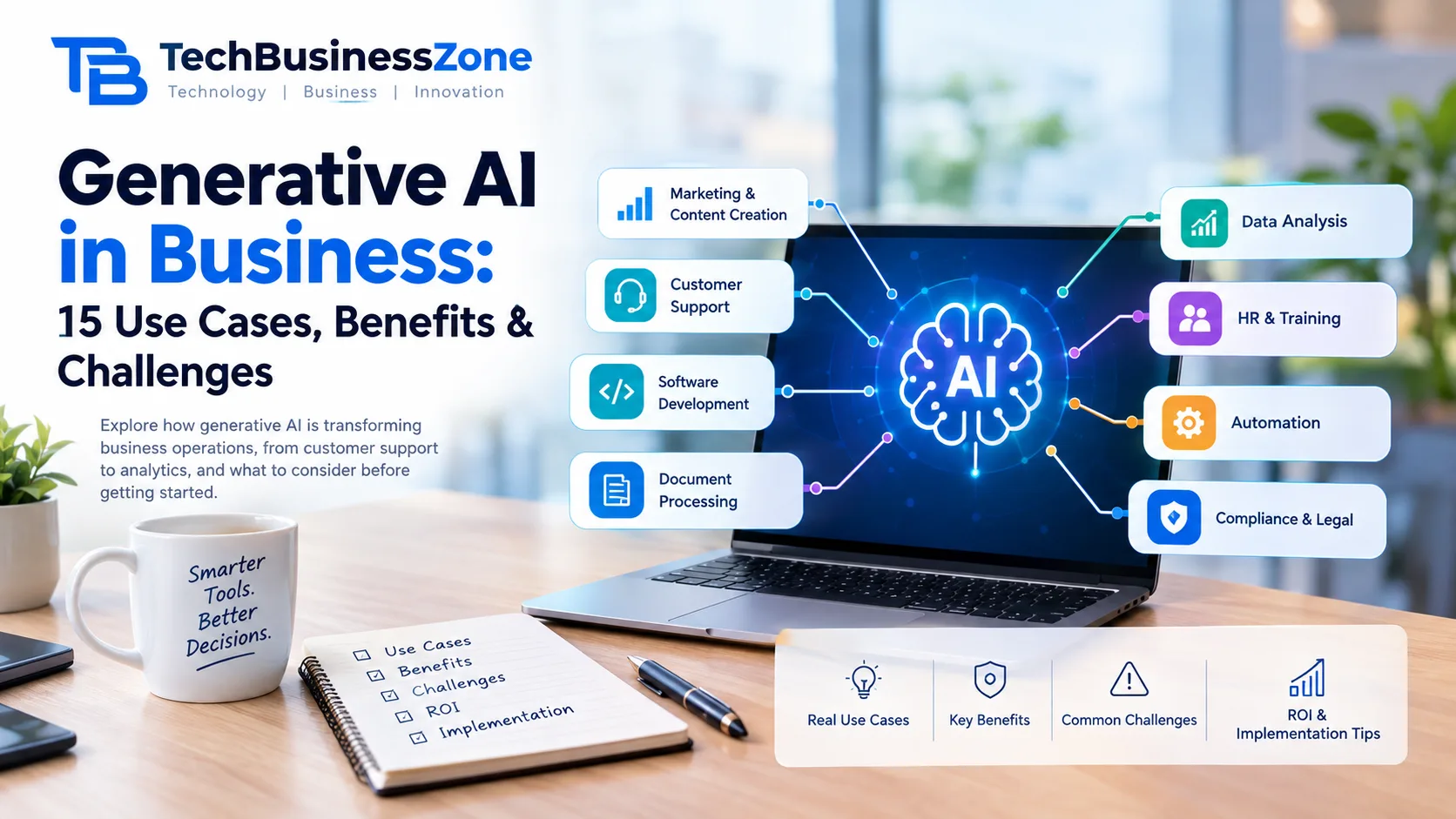
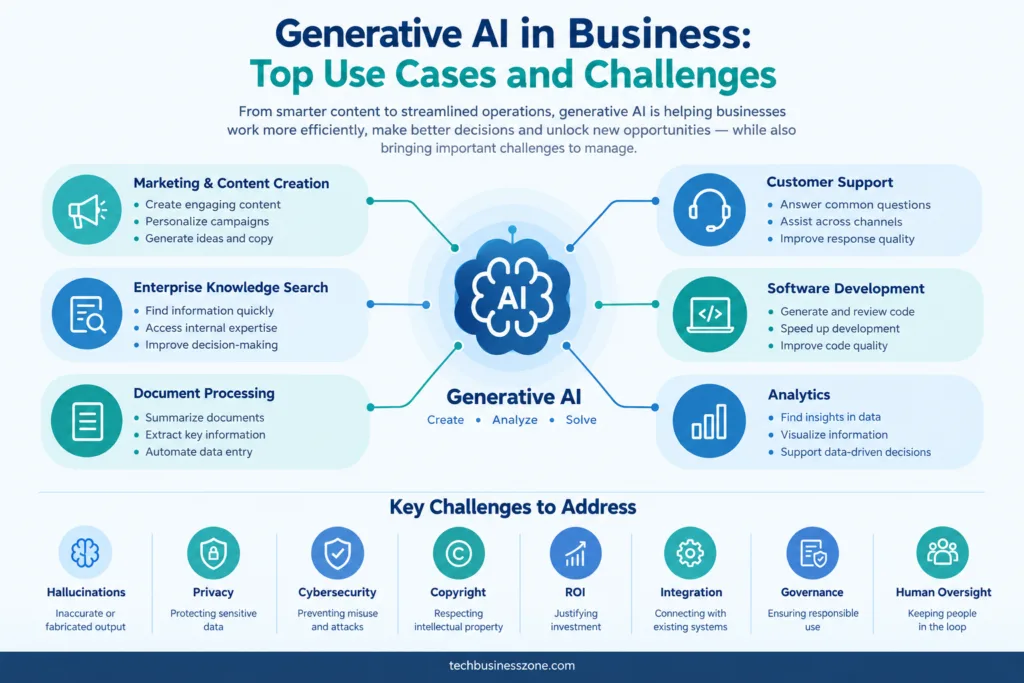
Generative AI in Business: Top Use Cases and Challenges
Generative AI is moving beyond standalone chatbots. Businesses now use it to draft documents, assist software developers, answer questions from internal knowledge bases, summarize customer conversations, and support workflows that once required hours of manual work.
But adopting an AI tool is not the same as creating business value.
A model can produce a convincing answer and still be wrong. Chatbot can reduce support workload in one situation while creating additional review work in another. A workflow that looks easy to automate may become difficult once privacy, permissions, system integration, and accountability enter the picture.
The useful question is not simply, “Where can we use generative AI?”
It is:
Which business tasks can benefit from generative AI, what risks come with them, and how can a company measure whether the technology is actually helping?
This guide examines the main generative AI use cases in business, the challenges organizations need to plan for, and a practical way to decide where to start.
What Is Generative AI in Business?
Generative AI refers to artificial intelligence systems that create or transform content based on instructions and available context. Depending on the model and application, that content can include text, code, images, audio, video, summaries, structured information, and more.
In a business setting, generative AI is usually used to assist an employee, process information, or generate an output that becomes part of an existing workflow.
For example, a company might use it to:
- Draft a customer-service response.
- Summarize a long internal report.
- Generate a first version of a software function.
- Extract key details from an invoice.
- Answer employee questions using approved company documents.
- Turn meeting notes into an action-item list.
- Create several versions of a marketing email.
The important distinction is that generative AI produces an output; the business still needs to decide how that output is checked, used, and acted upon.
Generative AI vs. Traditional AI and Automation
These technologies often work together, but they solve different problems.
| Technology | Main function | Business example |
|---|---|---|
| Generative AI | Creates, transforms, or summarizes information | Drafting a sales proposal |
| Database/search system | Predicts outcomes or identifies patterns | Forecasting demand |
| Rule-based automation | Executes predefined instructions | Sending an invoice after an approved purchase |
| Database / search system | Retrieves stored information | Finding an exact customer record |
| Workflow automation | Connects tasks and systems | Moving approved data from a form into a CRM |
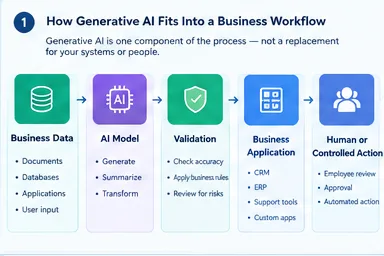
A business does not need to replace its existing systems with generative AI. In many cases, the best implementation combines a language model with databases, search, business rules, APIs, and human review.
How Businesses Access Generative AI
Organizations can use generative AI through several approaches:
- Public AI assistants.
- Enterprise AI platforms.
- AI features built into existing SaaS software.
- API-based applications.
- Retrieval-augmented generation (RAG) systems.
- Custom or fine-tuned models.
- AI agents connected to business tools.
The right option depends on the sensitivity of the data, the complexity of the workflow, the required integrations, and the level of control the company needs.
Why Are Businesses Adopting Generative AI?
The strongest business cases usually involve work that is repetitive, information-heavy, time-consuming, or difficult to scale manually.
Common reasons for adoption include:
- Reducing repetitive knowledge-work effort.
- Improving access to internal information.
- Speeding up content and document production.
- Supporting customer and employee service.
- Assisting software development.
- Improving workflow throughput.
- Supporting research and analysis.
- Creating new products or services.
- Helping employees work with information more efficiently.
However, the expected benefit depends on the task. Generating a first draft may save time, but the final output could still require substantial editing. An internal knowledge assistant may help employees find information faster, but only if the underlying documents are accurate and accessible.
Where Generative AI Creates the Most Value
A business use case is generally easier to evaluate when it has:
- A clearly defined workflow.
- Frequent, repeatable tasks.
- Clear inputs and expected outputs.
- Reliable data.
- A measurable baseline.
- A reasonable way to review AI-generated results.
- A defined owner responsible for the process.
A useful starting point is not “Which AI tool should we buy?” but “Which task is consuming time or creating friction, and can AI improve it without introducing unacceptable risk?”
IBM’s enterprise use-case guidance similarly emphasizes frequent, well-defined tasks, trusted data, measurable outcomes, and human oversight.
Top Generative AI Use Cases in Business
The following applications are organized by the work businesses actually perform. Some are relatively easy to pilot, while others require stronger data controls, integrations, and professional oversight.
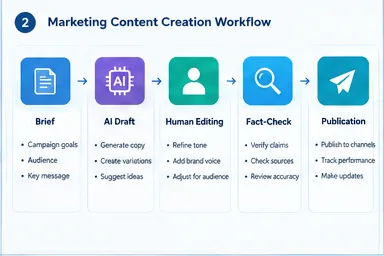
1. Marketing and Content Creation
The Marketing is one of the most visible applications of generative AI because much of the work involves producing, adapting, and organizing language or creative material.
Marketing Content Generation
Businesses use generative AI to assist with:
- Blog drafts and content briefs.
- Email campaigns and newsletters.
- Social media copy.
- Product descriptions.
- Advertising variations.
- Landing-page copy.
- Campaign messaging.
- Creative brainstorming.
The practical benefit is usually speed during the early stages of production. A marketer can use AI to organize ideas, create a first draft, or adapt existing material for different audiences.
That does not remove the need for editorial judgment. A generated article may contain inaccurate claims, repetitive language, or messaging that does not match the company’s positioning.
Content Personalization
Generative AI can also help create variations of existing content for different audiences.
Examples include:
- Adapting an email for different customer segments.
- Creating alternative subject lines.
- Localizing marketing copy.
- Drafting audience-specific product explanations.
- Adjusting the tone of a campaign for different channels.
Personalization becomes more complicated when it uses customer information. Businesses need to understand what data is being used, whether it is permitted, and whether the generated content could reveal sensitive information.
Marketing Research and Campaign Analysis
Generative AI can support research by:
- Summarizing customer feedback.
- Grouping recurring themes in survey responses.
- Turning research notes into campaign briefs.
- Summarizing competitor content for internal analysis.
- Preparing draft campaign reports.
The output should be treated as an aid to analysis rather than a substitute for checking the underlying data.
Marketing Risks to Watch
- Incorrect product or service claims.
- Inconsistent brand voice.
- Copyright and originality concerns.
- Poor-quality mass-generated content.
- Mishandling customer data.
- Publishing unreviewed material.
2. Customer Service and Support
Customer support is another major area for generative AI because support teams handle large volumes of repetitive questions, conversations, and documentation.
AI-Powered Customer-Service Assistants
A generative AI system can help with:
- Answering common customer questions.
- Drafting support responses.
- Summarizing conversations.
- Suggesting next steps.
- Categorizing tickets.
- Supporting multilingual communication.
- Finding relevant help-center information.
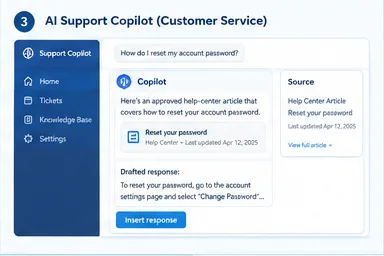
A basic chatbot and a more advanced support copilot are not the same thing.
A chatbot may interact directly with customers. A copilot may assist a human agent by retrieving information and suggesting a response while leaving the final communication to the employee.
Internal Support Copilots
An internal assistant can help support agents:
- Find product documentation.
- Locate relevant policies.
- Review previous case information.
- Summarize a customer’s issue.
- Draft a response based on approved resources.
- Prepare escalation notes.
This approach can be useful when agents spend significant time searching across multiple knowledge sources.
Customer-Service Automation vs. Human Support
Generative AI is more suitable for routine, lower-risk questions when the business has reliable information and clear escalation rules.
Human involvement remains important when a case involves:
- A complaint requiring judgment.
- A refund or financial dispute.
- Sensitive personal information.
- A legal or safety issue.
- An unusual technical problem.
- A customer who needs an exception to standard policy.
The goal should not be to force every conversation through AI. It should be to make support faster and more consistent without making it harder for customers to reach a person.
3. Software Development and IT Operations
Software development is one of the most practical areas for generative AI because code, documentation, tests, and technical explanations can all be generated or transformed.
AI-Assisted Software Development
Developers use generative AI for tasks such as:
- Generating code snippets.
- Explaining unfamiliar code.
- Refactoring existing code.
- Creating test cases.
- Suggesting debugging approaches.
- Writing documentation.
- Converting code between languages.
- Assisting with API integration.
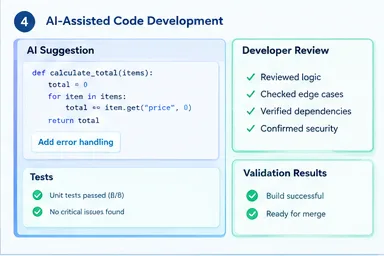
These uses can reduce time spent on routine work, particularly when the developer already understands the problem and can verify the output.
AI-generated code still needs review. A function that looks correct may fail on edge cases, introduce a security problem, use an unsuitable dependency, or conflict with the application’s architecture.
IT Service Management and Operations
Generative AI can also assist IT teams with:
- Incident summaries.
- Log and error explanations.
- Ticket classification.
- Knowledge-base responses.
- Runbook drafting.
- Infrastructure documentation.
- Routine support questions.
The distinction between explanation and execution matters. Asking AI to explain an error is different from giving an AI system permission to change production infrastructure.
Why AI-Generated Code Requires Engineering Review
Important checks include:
- Security vulnerabilities.
- Incorrect assumptions.
- Dependency and licensing concerns.
- Test coverage.
- Maintainability.
- Performance.
- Production reliability.
- Compatibility with existing systems.
You can read our blog post AI code generation.
4. Knowledge Management and Enterprise Search
Many businesses have useful information scattered across documents, emails, support systems, wikis, shared drives, and internal applications. Finding the right information can take longer than creating a new answer.
Generative AI can help employees interact with that information using natural language.
Internal Knowledge Assistants
Possible uses include:
- Answering employee questions.
- Searching company documentation.
- Explaining internal policies.
- Supporting employee onboarding.
- Summarizing internal resources.
- Finding relevant procedures.
- Connecting information across approved repositories.
The quality of the answer depends heavily on the quality and accessibility of the underlying information.
How Retrieval-Augmented Generation Works
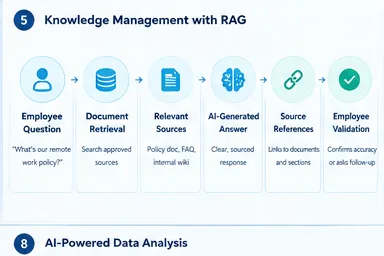
Retrieval-augmented generation, commonly called RAG, connects a language model to external information sources.
A simplified workflow looks like this:
- An employee asks a question.
- The system searches approved business documents.
- Relevant passages are retrieved.
- The model uses those passages to generate an answer.
- The system may show source references.
- The employee checks the answer or follows the recommended process.
RAG can reduce reliance on a model’s general training knowledge, but it does not guarantee accuracy. If the retrieved document is outdated, incomplete, or irrelevant, the answer may still be wrong.
Knowledge Management Challenges
- Outdated documentation.
- Conflicting policies.
- Missing context.
- Poor document organization.
- Incorrect retrieval.
- Permission leakage.
- Unclear content ownership.
- Lack of maintenance.
A knowledge assistant is only as useful as the information governance behind it.
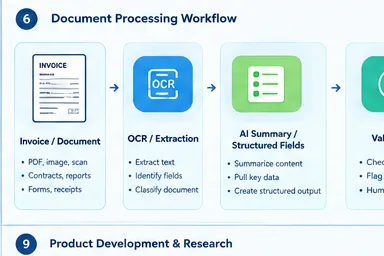
5. Document Processing and Business Administration
Businesses process large quantities of documents, including invoices, contracts, reports, forms, meeting notes, and correspondence.
Generative AI can assist with the language-heavy parts of this work, especially when documents contain information that must be summarized, extracted, or reorganized.
Common Document-Processing Use Cases
- Summarizing contracts and reports.
- Extracting information from documents.
- Drafting business correspondence.
- Processing invoice information.
- Preparing meeting notes.
- Comparing document versions.
- Turning unstructured text into structured records.
- Creating internal summaries.
How Document AI and Generative AI Work Together
A document workflow may combine several technologies:
- OCR: Converts scanned documents into machine-readable text.
- Document extraction: Identifies fields, tables, and relevant information.
- Classification: Determines the type or category of a document.
- Generative AI: Summarizes, explains, or transforms the extracted information.
- Validation: Checks whether the output is complete and accurate.
- Human approval: Reviews important results before they enter a business system.
This combination is often more reliable than asking a language model to handle every step independently.
Controls for Business Documents
Businesses should consider:
- Confidentiality.
- Data retention.
- Access permissions.
- Audit trails.
- Document accuracy.
- Human approval.
- Integration with existing systems.
- Legal and regulatory requirements.
6. Sales and Revenue Operations
Sales teams spend considerable time researching accounts, preparing communications, updating records, and organizing customer information. Generative AI can assist with several of these tasks.
Sales Enablement
Potential applications include:
- Prospect research summaries.
- Account briefs.
- Sales-email drafting.
- Proposal assistance.
- Presentation content.
- Call summaries.
- Follow-up drafts.
- Sales objection preparation.
The value is usually in reducing preparation time and helping salespeople organize information.
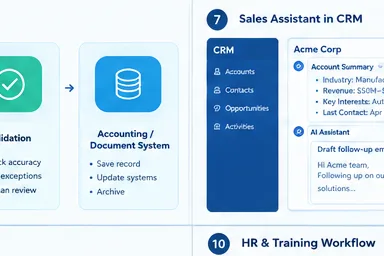
CRM and Revenue Workflow Assistance
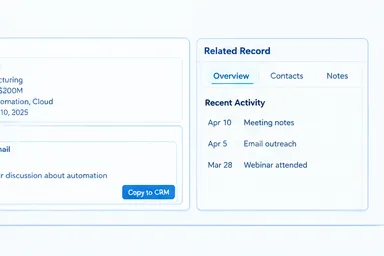
Generative AI can also support CRM-related work by:
- Summarizing account activity.
- Drafting CRM notes.
- Preparing meeting briefs.
- Generating sales collateral.
- Suggesting follow-up questions.
- Identifying missing information.
These workflows require careful handling of customer data and should not automatically turn generated assumptions into CRM facts.
Risks in AI-Assisted Sales
- Incorrect customer information.
- Unsupported product claims.
- Privacy problems.
- Poorly targeted outreach.
- Spam.
- Over-personalization.
- Unreviewed external communications.
7. Data Analysis, Reporting, and Decision Support
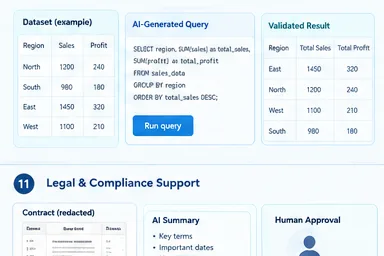
Generative AI can make data work more accessible by allowing users to ask questions in natural language, generate SQL, explain reports, and summarize findings.
But there is an important distinction between helping someone analyze data and being trusted to decide without validation.
How Generative AI Supports Business Analysis
Potential uses include:
- Asking natural-language questions about approved data.
- Explaining dashboard results.
- Generating SQL queries.
- Suggesting data-cleaning steps.
- Summarizing trends.
- Drafting management reports.
- Explaining technical analysis to nontechnical teams.
What Generative AI Should Not Do Alone
Businesses should not assume that a generated response is automatically correct when it involves:
- Financial conclusions.
- Numerical calculations.
- Forecasts.
- Regulatory reporting.
- High-stakes decisions.
- Sensitive business data.
- Complex statistical interpretation.
A generated SQL query should be checked. A generated calculation should be validated. A summary should be compared with the source data when the consequences matter.
Combining GenAI With Traditional Analytics
A reliable business-analysis workflow may combine:
- Databases.
- Business intelligence tools.
- Statistical models.
- Predictive machine learning.
- Rules-based validation.
- Human review.
Generative AI can make these systems easier to interact with, but it does not replace the systems that store and validate the underlying information.
8. Product Development, Research, and Innovation
Generative AI can assist teams during research, product planning, prototyping, and documentation.
Product Research and Ideation
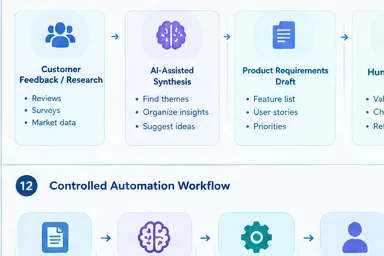
Teams may use it to:
- Summarize customer feedback.
- Organize market research.
- Brainstorm product concepts.
- Draft product requirements.
- Explore user personas.
- Generate alternative product ideas.
- Turn research notes into structured briefs.
The key limitation is that AI-generated ideas are not market validation. A plausible product concept still needs customer research, testing, and business analysis.
Product Design and Prototyping
Generative AI can support:
- Interface concepts.
- Prototype copy.
- User stories.
- Technical documentation.
- Test-case generation.
- Product-support content.
- Early design exploration.
Research and Development Support
Potential uses include:
- Summarizing technical documents.
- Organizing research findings.
- Exploring hypotheses.
- Drafting experiment documentation.
- Supporting knowledge discovery.
Limits in Product and Scientific Work
- Unverified information.
- Weak or fabricated sources.
- Intellectual-property concerns.
- Lack of reproducibility.
- Confidential product information.
- Need for domain-expert review.
9. Human Resources, Training, and Employee Support
HR teams and internal training departments handle substantial amounts of documentation, communication, and repetitive questions.
HR and People-Operations Use Cases
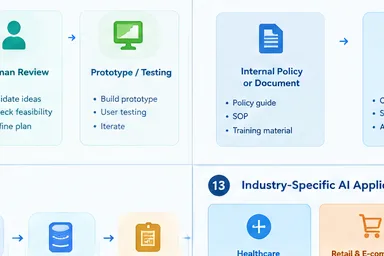
Generative AI can assist with:
- Job-description drafts.
- Onboarding materials.
- Internal policy explanations.
- Training content.
- Employee FAQ assistants.
- Meeting summaries.
- Internal communication drafts.
Learning and Development
Businesses may use generative AI to create:
- Practice questions.
- Role-specific training material.
- Learning explanations.
- Skill-development resources.
- Internal knowledge tutoring.
- Training scenarios.
HR-Specific Risks
HR use cases require additional caution because employee information and employment decisions can be sensitive.
Important concerns include:
- Bias.
- Confidential employee data.
- Unfair recommendations.
- Privacy.
- Employment-law requirements.
- Human review of consequential decisions.
Generative AI may assist with administrative work, but businesses should not treat it as an independent authority for hiring, promotion, or termination decisions.
10. Finance, Legal, and Compliance Support
Finance, legal, and compliance teams work with documents, policies, records, and research. Generative AI can assist with information-heavy tasks, but these functions often have stricter accuracy and confidentiality requirements.
Finance-Related Assistance
Possible uses include:
- Financial document summaries.
- Invoice and expense workflows.
- Report drafting.
- Policy explanations.
- Internal finance questions.
- Variance explanations using validated data.
Legal and Compliance Assistance
Generative AI may help with:
- Contract review support.
- Clause comparison.
- Policy drafting.
- Regulatory-document summaries.
- Compliance research assistance.
- Audit-document organization.
Why High-Stakes Functions Need Stronger Controls
These workflows can involve:
- Confidential information.
- Regulatory obligations.
- Financial consequences.
- Legal responsibility.
- Auditability.
- Professional judgment.
- Strict approval requirements.
A model can help a professional review information, but it should not be treated as a substitute for professional responsibility.
11. Operations, Supply Chain, and Workflow Automation
Generative AI can help operations teams work with unstructured information and connect language-based tasks to existing workflows.
Operational Use Cases
Potential applications include:
- Workflow documentation.
- Supplier communication drafts.
- Purchase-order information summaries.
- Operations reports.
- Exception explanations.
- Internal process assistance.
- Cross-system workflow coordination.
Generative AI in Automated Workflows
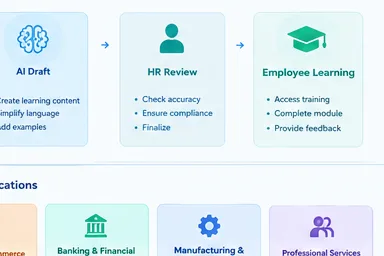
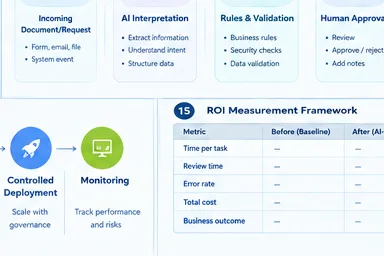
A workflow might follow this pattern:
- A document, message, or form enters the system.
- AI extracts or interprets relevant information.
- The system generates a structured output.
- Business rules validate the result.
- A human approves it, or the system performs a permitted action.
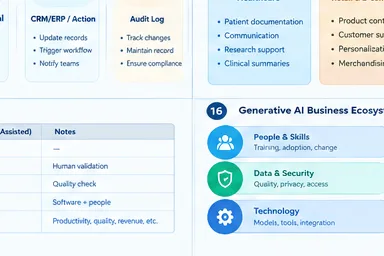
- The workflow records what happened.
This is different from giving a model unrestricted control over business systems.
GenAI vs. Traditional Workflow Automation
Traditional automation is often better when a process follows fixed, predictable rules.
Generative AI becomes more useful when the workflow involves:
- Unstructured text.
- Natural-language requests.
- Document interpretation.
- Summarization.
- Drafting.
- Context-dependent assistance.
A reliable system may use GenAI for interpretation and traditional automation for the final controlled action.
Read our blog post AI workflow automation tools.
12. Industry-Specific Generative AI Applications
The use cases above apply across industries, but the data, risks, and oversight requirements change depending on the sector.
Healthcare
Potential applications include:
- Administrative documentation.
- Patient communication support.
- Research assistance.
- Clinical document summarization.
Healthcare use cases require strict privacy controls and appropriate professional oversight.
Retail and E-commerce
Potential applications include:
- Product descriptions.
- Customer support.
- Personalized marketing.
- Product discovery.
- Merchandising assistance.
Banking and Financial Services
Potential applications include:
- Document processing.
- Customer-service assistance.
- Internal knowledge systems.
- Compliance support.
Financial services require strong controls around data, accuracy, security, and regulatory obligations.
Manufacturing and Engineering
Potential applications include:
- Technical documentation.
- Maintenance knowledge support.
- Design assistance.
- Operations reporting.
- Engineering research.
Education and Professional Services
Potential applications include:
- Training materials.
- Research support.
- Administrative workflows.
- Client-document assistance.
- Internal knowledge systems.
Across all industries, the same principle applies: the more consequential the output, the more important validation, accountability, and access controls become.
Generative AI Business Use Cases Compared
The following table compares common business applications by the type of work involved, implementation considerations, and risk. The assessments are qualitative rather than measured performance results.
Comparision of Generative AI in Business
| Business use case | Primary department | Typical AI task | Main business value | Data/integration needs | Human oversight | Main risks |
|---|---|---|---|---|---|---|
| Marketing content | Marketing | Drafting, rewriting, personalization | Faster content production | Brand guidelines, campaign data, content tools | Moderate | Inaccurate claims, brand inconsistency, IP |
| Customer support | Support | Answering, summarizing, response suggestions | Faster service and agent assistance | Help center, CRM, ticketing system | Moderate to high | Incorrect answers, privacy, poor escalation |
| Software development | Engineering | Code generation, explanation, testing | Development assistance | Codebase, IDE, repositories, testing tools | High | Security, bugs, licensing, maintainability |
| Enterprise knowledge search | IT / Operations | Retrieval and question answering | Faster access to information | Approved documents, permissions, search/RAG | Moderate | Outdated sources, access leakage, hallucinations |
| Document processing | Finance / Operations | Extraction, summarization, classification | Reduced manual document work | OCR, document storage, business systems | Moderate to high | Extraction errors, confidentiality, compliance |
| Sales enablement | Sales | Research summaries, emails, proposals | Faster preparation and follow-up | CRM, account data, sales content | Moderate | Incorrect customer data, unsupported claims |
| Data analysis | Finance / Business Intelligence | Query assistance, report summaries | Easier analysis and reporting | Databases, BI tools, validated data | High | Incorrect calculations, misleading conclusions |
| Product development | Product / R&D | Ideation, requirements, research summaries | Faster early-stage work | Research, feedback, product documentation | Moderate to high | Unverified ideas, IP, poor research |
| HR and training | HR / L&D | Drafting, tutoring, internal Q&A | Administrative and learning support | HR policies, training materials | High for sensitive decisions | Bias, privacy, unfair recommendations |
| Finance / legal support | Finance / Legal | Document review, summaries, drafting | Faster information handling | Controlled documents, approved systems | High | Legal, financial, confidentiality risks |
| Operations automation | Operations / IT | Interpretation, structured outputs, workflow assistance | Reduced manual coordination | APIs, ERP/CRM, rules, permissions | Moderate to high | Incorrect actions, integration failures, access risks |
How to read this table: “Human oversight” is not a universal technical rating. It reflects the potential consequences of errors and the need to validate outputs within a particular workflow.
What Are the Main Challenges of Generative AI in Business?
The challenges extend beyond whether a model produces a useful answer. Businesses must also consider what happens when the output is incorrect, who can access the data, how the system connects to existing software, and who is accountable for the final result.
1. Accuracy, Hallucinations, and Unreliable Outputs
However, despite its ability to generate convincing responses, generative AI can produce answers that sound confident but contain incorrect information. These errors are often called hallucinations.
Common problems include:
- Incorrect facts.
- Fabricated sources.
- Misinterpreted context.
- Inconsistent responses.
- Incorrect calculations.
- Unsupported recommendations.
The level of risk depends on the task. A flawed brainstorming suggestion may be easy to correct, while an incorrect financial report, legal summary, or customer-service answer can have more serious consequences.
Useful controls include:
- Grounding answers in approved sources.
- Requiring citations where appropriate.
- Testing representative inputs.
- Validating important outputs.
- Adding human review.
- Tracking recurring error patterns.
Businesses should never assume that generative AI is accurate simply because its output sounds professional.
2. Data Privacy and Confidentiality
Businesses may want to use AI with customer records, employee information, contracts, product plans, or internal documentation.
That creates questions about:
- What data is sent to the provider.
- How the provider stores and processes it.
- Whether data is used for model training.
- Who can access the information.
- How long data is retained.
- Whether the deployment meets company requirements.
- Whether employees understand approved usage.
A public AI tool and an enterprise deployment may offer different controls. Organizations should assess the actual product terms and configuration rather than assume that every AI service handles data in the same way.
3. Cybersecurity and Prompt Injection
AI systems connected to business information or tools introduce additional security concerns.
Potential risks include:
- Malicious instructions embedded in documents.
- Prompt injection.
- Data exfiltration.
- Insecure integrations.
- Excessive permissions.
- Unsafe AI-generated code.
- Unauthorized actions through connected tools.
A system that can read documents is not automatically safe to give permission to send emails, modify records, or execute infrastructure changes.
Security controls should include:
- Least-privilege access.
- Input and output validation.
- Permission boundaries.
- Testing for prompt injection.
- Monitoring.
- Secure integration design.
- Human approval for sensitive actions.
4. Intellectual Property and Copyright
Generative AI raises questions about both input material and generated output.
Businesses should consider:
- Whether they have permission to use input content.
- How generated material is reviewed.
- Whether outputs resemble protected work.
- Licensing requirements.
- Attribution.
- Vendor contract terms.
- Indemnification limitations.
- Ownership and usage rights.
The legal treatment of AI-generated content can vary by jurisdiction and circumstance. Companies should not assume that every output is automatically free of copyright or licensing concerns.
5. Cost and Uncertain Return on Investment
A low-cost AI subscription may be easy to purchase, but a production-grade business system can require much more.
Potential costs include:
- Model or API usage.
- Software subscriptions.
- Integration and development.
- Data preparation.
- Security review.
- Training.
- Human review.
- Monitoring.
- Maintenance.
- Error correction.
- Vendor changes.
A useful ROI assessment compares the full cost of the AI-assisted workflow with the existing process.
Saving time on a task is not automatically the same as saving money. The business needs to determine whether the time saved improves throughput, reduces cost, increases quality, or creates another measurable benefit.
6. Integration With Existing Systems
Many business workflows depend on software that was not designed with generative AI in mind.
Integration challenges may involve:
- Legacy applications.
- APIs and connectors.
- Data silos.
- Authentication.
- Permissions.
- Workflow orchestration.
- Reliability.
- System maintenance.
An AI assistant that works well in a demonstration may require significant engineering effort to operate reliably inside a real business process.
7. Data Quality and Context Limitations
Generative AI cannot compensate for every problem in a company’s data.
Common obstacles include:
- Incomplete records.
- Outdated documents.
- Conflicting information.
- Poor metadata.
- Missing business context.
- Unstructured files.
- Unclear ownership.
Before building a knowledge assistant or document workflow, businesses should understand the condition of the information it will use.
8. Workforce Skills and Organizational Change
Introducing AI changes how employees perform tasks. It may reduce some manual work while increasing the need for review, judgment, process design, and technical understanding.
Organizations may need to invest in:
- AI literacy.
- Employee training.
- Workflow redesign.
- Clear usage policies.
- Human-AI collaboration.
- Review procedures.
- Role-specific guidance.
Employees also need to understand when not to trust an output. Adoption is more useful when people know both what the system can do and where it can fail.
9. Bias, Fairness, and Ethical Concerns
Generative AI can reproduce or amplify biases present in its training data, prompts, retrieved information, or surrounding workflow.
Concerns may arise in:
- Hiring support.
- Customer treatment.
- Employee evaluation.
- Content moderation.
- Recommendations.
- Access to services.
Businesses should assess whether a use case could produce unequal outcomes and establish appropriate testing and oversight.
10. Compliance, Governance, and Accountability
A business needs to know who is responsible for an AI system and how it is governed.
Relevant questions include:
- Is there an approved AI-use policy?
- Who owns the workflow?
- What data can employees use?
- How are vendors assessed?
- What records are retained?
- How are incidents handled?
- How are outputs reviewed?
- Who is accountable for decisions?
Governance should reflect the risk of the use case. A low-risk drafting assistant does not require the same controls as a system supporting financial, legal, medical, or employment decisions.
McKinsey’s risk guidance similarly recommends assessing risks by use case rather than treating every generative AI application as having the same risk profile.
11. Reliability, Scalability, and Performance
A business workflow may depend on an AI service being available, responsive, and consistent.
Operational concerns include:
- Latency.
- Availability.
- Rate limits.
- Model changes.
- Output variability.
- Monitoring.
- Business continuity.
- Vendor dependency.
A successful pilot needs to be evaluated under realistic conditions. A system that works for a few demonstrations may behave differently when usage increases, or inputs become more varied.
12. Environmental and Infrastructure Costs
Generative AI systems require computing resources for training and inference. The environmental impact varies according to factors such as the model, hardware, workload, deployment, and efficiency.
Businesses evaluating large-scale AI use should consider:
- Compute requirements.
- Model efficiency.
- Inference volume.
- Infrastructure choices.
- Workload optimization.
- Whether a smaller model is sufficient for the task.
Avoid treating environmental impact as a single fixed number that applies to every AI request.
How Should a Business Choose a Generative AI Use Case?
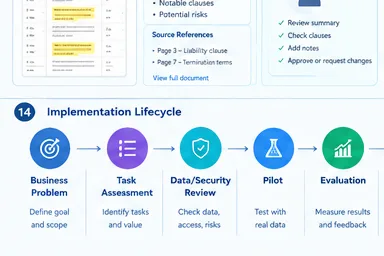
The best starting point is usually a specific business problem rather than a general desire to “implement AI.”
Start With a Business Problem, Not an AI Tool
Ask:
- What process is slow or repetitive?
- Which team performs the work?
- How often does it happen?
- What does the current process cost?
- What outcome needs to improve?
- What would success look like?
This prevents the project from becoming a technology experiment without a measurable purpose.
Break the Workflow Into Individual Tasks
A process may contain several different types of work.
For example, a customer-support workflow might involve:
- Receiving a customer message.
- Identifying the issue.
- Finding relevant information.
- Drafting a response.
- Checking the response.
- Sending the reply.
- Recording the interaction.
Generative AI may be useful for some steps but not others. The goal is to identify where it adds value without creating unnecessary risk.
MIT Sloan’s guidance recommends breaking workflows into tasks, considering the full cost of automation, and launching pilots rather than attempting to automate an entire process at once.
Evaluate Data and Integration Requirements
Before selecting a system, assess:
- What data is required.
- Whether the data is accurate.
- Who can access it.
- Whether it contains sensitive information.
- Where it is stored.
- Which business systems must connect.
- Whether APIs or connectors are available.
- How the workflow will be maintained.
Assess Risk and Human Oversight
Not every AI task needs the same level of review.
| Risk level | Example | Typical control |
|---|---|---|
| Lower risk | Drafting internal brainstorming notes | Employee review |
| Moderate risk | Internal policy question answering | Approved sources and validation |
| Higher risk | Financial, legal, medical, or employment support | Strong validation, professional oversight, approval |
The categories should be adapted to the actual business context. A seemingly simple task can become high-risk if it involves sensitive data or consequential decisions.
Estimate Total Cost and Expected Value
Consider:
- Existing process cost.
- AI software or API cost.
- Integration.
- Data preparation.
- Security and compliance.
- Human review.
- Training.
- Monitoring.
- Maintenance.
- Cost of incorrect outputs.
The objective is not to prove that AI is always cheaper. It is to determine whether the proposed workflow produces enough value to justify its cost and risk.
Pilot Before Scaling
A sensible pilot should:
- Focus on a narrow workflow.
- Establish a baseline.
- Define success criteria.
- Use representative data.
- Test output quality.
- Record errors and corrections.
- Review privacy and security.
- Collect employee feedback.
- Measure results.
- Decide whether to expand, redesign, or stop.
A pilot that fails to produce value is not necessarily wasted effort. It can reveal that the workflow is unsuitable, the data is not ready, or the system needs a different design.
How to Implement Generative AI Responsibly in Business
Once a use case has been selected, implementation needs more than a model and an interface.
Define Ownership and Responsibilities
Identify:
- Business process owner.
- IT or engineering team.
- Security stakeholders.
- Legal or compliance stakeholders.
- End users.
- Executive sponsor.
- Person responsible for reviewing outputs.
- Person responsible for handling incidents.
Without clear ownership, an AI system can become a tool that everyone uses, but nobody maintains.
Select the Right Deployment Approach
Common approaches include:
| Approach | Suitable consideration |
|---|---|
| Public AI assistant | Individual or low-sensitivity work, subject to company policy |
| Enterprise SaaS AI feature | Teams that need AI within an existing business application |
| API-based application | Custom workflows and controlled integrations |
| RAG system | Questions requiring access to approved internal information |
| Custom or fine-tuned model | Specialized requirements that justify additional complexity |
| AI agent / tool-connected system | Multi-step workflows requiring carefully controlled tool access |
The most advanced approach is not automatically the best one. A simple enterprise feature may be more appropriate than a custom agent if the business only needs drafting or summarization.
Build Data and Access Controls
Important controls include:
- Approved data sources.
- Role-based access.
- Sensitive-data restrictions.
- Retrieval permissions.
- Data retention policies.
- Audit logs.
- Vendor assessment.
- Clear employee usage rules.
A system should not expose information to a user merely because the AI can retrieve it.
Establish Evaluation and Monitoring
Useful evaluation areas include:
- Accuracy.
- Relevance.
- Groundedness.
- Response quality.
- Safety.
- Latency.
- Cost per task.
- User adoption.
- Error rates.
- Escalation frequency.
Monitoring should continue after deployment. Models, data, integrations, and user behavior can change over time.
Keep Humans Involved Where Consequences Are High
Human review is especially important when an AI output could affect:
- Money.
- Legal obligations.
- Employment.
- Safety.
- Privacy.
- Customer rights.
- Business-critical infrastructure.
The level of oversight should match the consequences of an error.
How to Measure the ROI of Generative AI in Business
A business should not measure success only by the number of employees using an AI tool or the number of prompts submitted.
Establish a Baseline Before Deployment
Depending on the workflow, measure:
- Processing time.
- Labor effort.
- Error rate.
- Customer response time.
- Cost per task.
- Existing quality scores.
- Employee satisfaction.
- Volume completed.
Without a baseline, it is difficult to know whether the AI system actually improved the process.
Choose Metrics That Match the Use Case
| Use case | Useful metrics |
|---|---|
| Customer support | Response time, resolution rate, quality, escalation rate |
| Content production | Production time, editing effort, accuracy, approval rate |
| Software development | Review effort, defect rate, test coverage, cycle time |
| Document processing | Processing time, extraction accuracy, correction rate |
| Knowledge assistant | Answer quality, source accuracy, resolution time, user feedback |
| Sales support | Preparation time, follow-up completion, data quality |
| Data analysis | Validation accuracy, query success, correction rate |
These metrics should be selected based on the actual workflow rather than applied universally.
Account for Hidden Costs
ROI calculations should include:
- Human review.
- Rework.
- Integration.
- Data preparation.
- Security.
- Training.
- Monitoring.
- Vendor changes.
- Downtime.
- Incorrect outputs.
A system that generates content twice as fast may not create value if employees spend the same amount of time correcting it.
Distinguish Productivity From Business Impact
More output does not automatically mean more profit.
Time saved may create value if it allows a team to:
- Handle more work.
- Improve service.
- Reduce costs.
- Focus on higher-value tasks.
- Improve quality.
- Increase capacity.
The business needs to connect the improvement to an actual outcome.
When Is Generative AI the Wrong Tool for a Business?
Generative AI is not the best solution for every problem.
A conventional technology may be more suitable when:
- Deterministic rules solve the task reliably.
- A database query can retrieve the exact answer.
- A process requires repeatable calculations.
- Traditional automation is cheaper.
- A predictive model is better suited to numerical forecasting.
- The cost of an incorrect output is too high without reliable validation.
- Sensitive data cannot be handled safely.
- The workflow has no clear owner or measurable outcome.
- AI adds complexity without meaningful benefit.
GenAI Is Often Part of a Larger Technology Stack
| Business requirement | Potentially suitable approach |
|---|---|
| Generate or transform content | Generative AI |
| Retrieve exact records | Database or search |
| Follow fixed business rules | Rule-based automation |
| Predict numerical outcomes | Predictive analytics or machine learning |
| Execute controlled workflows | Workflow automation |
| Make high-stakes judgments | Domain experts and validated systems |
The most effective business architecture may use generative AI for language and interpretation, traditional systems for data and rules, and people for judgment and accountability.
The Future of Generative AI in Business
The direction of business AI is moving toward more integrated systems rather than isolated chat windows.
From Standalone Chatbots to Embedded AI
Businesses are increasingly interested in AI features inside the tools employees already use.
Examples include:
- AI within productivity software.
- Context-aware copilots.
- Enterprise knowledge assistants.
- AI-supported CRM workflows.
- AI features inside development environments.
- Document-processing systems.
- Workflow-integrated assistants.
The benefit of embedded AI is that it can operate closer to the data and process where the work already happens. That also makes permissions, security, and governance more important.
The Growth of AI Agents
AI agents are often described as systems that can use tools, follow multi-step processes, and take actions toward a goal.
Compared with a basic text-generation workflow, an agent may:
- Retrieve information.
- Call an API.
- Update a system.
- Perform several steps.
- Respond to changing conditions.
- Coordinate tasks.
But greater autonomy introduces additional risks:
- Incorrect actions.
- Excessive permissions.
- Unclear decision paths.
- Difficult debugging.
- Security vulnerabilities.
- Unpredictable behavior.
Businesses should treat agents as a distinct implementation choice, not assume that every generative AI system needs autonomous action.
A recent business-use-case taxonomy separates lower-complexity work assistants from code generation, system-integrated text generation, and tool-using systems, reflecting the additional requirements that come with greater technical autonomy.
Smaller, Specialized, and More Efficient Models
Not every business task requires the largest available model.
Organizations may evaluate:
- Smaller models.
- Specialized models.
- Open-weight options.
- Hosted models.
- Private deployments.
- Task-specific systems.
The right choice depends on accuracy, cost, speed, privacy, infrastructure, and integration requirements.
From Experimentation to Measurable Value
The next stage of adoption is likely to focus less on the number of AI pilots and more on whether those pilots improve real workflows.
That means stronger attention to:
- Data foundations.
- Evaluation.
- Security.
- Workflow redesign.
- Governance.
- Employee training.
- Measurable outcomes.
The companies that benefit most will not necessarily be those using the most AI. They will be those choosing appropriate tasks and implementing them carefully.
Is Generative AI Right for Your Business?
Before starting a project, ask the following questions:
- Is there a clearly defined business problem?
- Is the workflow frequent enough to justify investment?
- Are the required data sources available?
- Is the data trustworthy?
- Can the output be evaluated?
- Is the risk acceptable?
- Is human oversight available where needed?
- Can the system integrate with existing tools?
- Can the business measure improvement?
- Are privacy and security requirements understood?
- Is there an owner responsible for the system?
Where Should a Business Start?
A practical starting point is usually a narrow, high-volume, relatively low-risk workflow.
For example, a business might begin with:
- Internal document summarization.
- Drafting routine communications.
- Employee knowledge search.
- Support-response assistance.
- Meeting-note organization.
- Developer documentation.
- Controlled document extraction.
The best first project is not necessarily the most impressive demonstration. It is the one where the company can establish a baseline, test the output, measure the result, and improve the process.
Frequently Asked Questions
What is generative AI in business?
Generative AI in business refers to using AI systems that create or transform content to assist employees, process information, support decisions, or improve workflows. Common outputs include text, code, summaries, images, and structured information.
What are the top use cases of generative AI in business?
Common use cases include marketing content, customer support, software development, enterprise knowledge search, document processing, sales enablement, data analysis, product research, HR support, finance and legal assistance, and workflow automation.
How does generative AI help businesses?
It can help businesses draft content, summarize information, answer questions, assist employees, process documents, support development, and reduce repetitive work. The actual benefit depends on the workflow, data quality, implementation, and review process.
What are the biggest challenges of generative AI in business?
The main challenges include inaccurate outputs, hallucinations, privacy, cybersecurity, copyright, cost, integration, data quality, workforce adoption, bias, governance, reliability, and compliance.
Is generative AI suitable for small businesses?
Yes, small businesses can use generative AI for practical tasks such as drafting content, customer-service assistance, document summaries, internal knowledge support, and routine communications. They should start with tools and workflows that match their budget, data sensitivity, and technical resources.
How can businesses measure generative AI ROI?
Businesses should establish a baseline, select metrics that match the use case, measure quality and productivity, account for implementation and review costs, and connect improvements to meaningful business outcomes.
Is generative AI the same as AI automation?
No. Generative AI creates or transforms information, while automation executes predefined or controlled tasks. They can work together, with AI handling language or interpretation and automation handling structured actions.
Should businesses use public AI tools for confidential data?
Businesses should not assume that public AI tools are appropriate for confidential data. They should review provider policies, enterprise controls, data-retention terms, permissions, and internal security requirements before using sensitive information.
Can generative AI replace employees?
Generative AI can automate or assist some tasks, but its effect depends on the workflow. In many cases, it changes employee responsibilities rather than eliminating an entire role. Human judgment, oversight, and accountability remain important, especially in high-risk work.
What is the first generative AI use case a business should try?
A good starting point is a narrow, measurable, low-risk workflow with clear inputs, outputs, and review criteria. Examples include internal document summarization, routine drafting, employee knowledge search, or support-response assistance.
Final Takeaway
Generative AI has practical business applications, but its value depends on how it is deployed.
The strongest use cases are not simply the ones that produce impressive outputs. They are the ones that solve a defined problem, use appropriate data, fit into an existing workflow, and include a way to measure quality and business impact.
Before adopting a tool, ask three questions:
- What task are we improving?
- What could go wrong?
- How will we know whether it worked?
Those questions provide a more reliable starting point than adopting AI simply because it is popular.